|
If you have the following problems and are working on non-English
region settings in Windows, update to the latest version of Rietica.
The reason behind this problem is:To: "'Lachlan Cranswick'" [l.m.d.cranswick@dl.ac.uk]
From: Brett Hunter [bah@ansto.gov.au]
Subject: RE: Rietica - from Hugo Rietveld
Date: Tue, 23 Oct 2001 07:23:14 +1000
Hi Lachlan,
It is in fact a Microsoft thing - the Regional Settings sets the decimal
point type depending on the conutry. Rietica now over writes the setting
(only for Rietica - other programs running at the same time use the
regional set ting) to be a ".".
It is a pain in the butt, but avoidable when you now about it.
Caio
brett
+------------------------------------------------------------------------------+
Dr Brett Hunter
Building 58, ANSTO,PMB 1, Menai,
NSW 2234, Australia
Work: -61-2-9717-3338
Fax: -61-2-9717-3606
email bah@ansto.gov.au
Web sites: http://www.ansto.gov.au/ansto/neut/s_hun.html
http://www.ansto.gov.au/ansto/neut/index.html
http://www.rietica.org
|
|
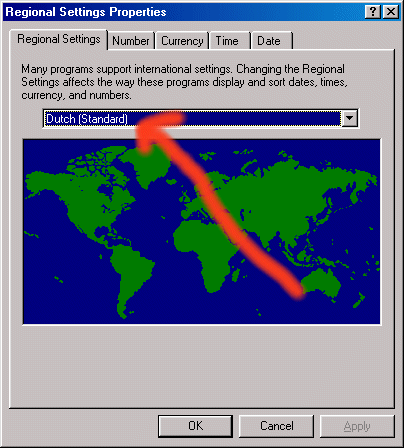
In the Windows, Control Panel, Regional Settings, check what your
computer is set to. In this case, it is on Dutch (standard).
|
|
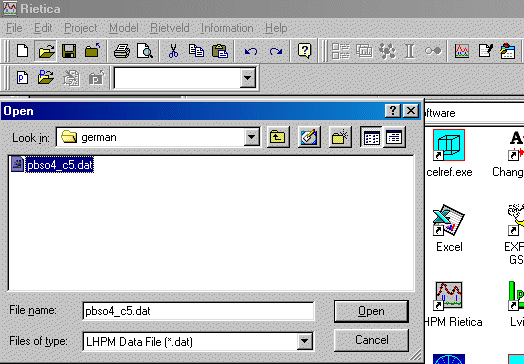
Now try and do something simple like opening a data file in Rietica.
|
|
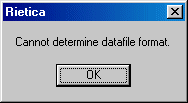
You may get the following Cannot determine datafile format error
|
|
Check the file format, but the main reason may be a problem with
Rietica and Windows. Getting the latest version of Rietica should
fix the problem.
|